Mobile MCQ practice for Sri Lankan A/L Accounting students
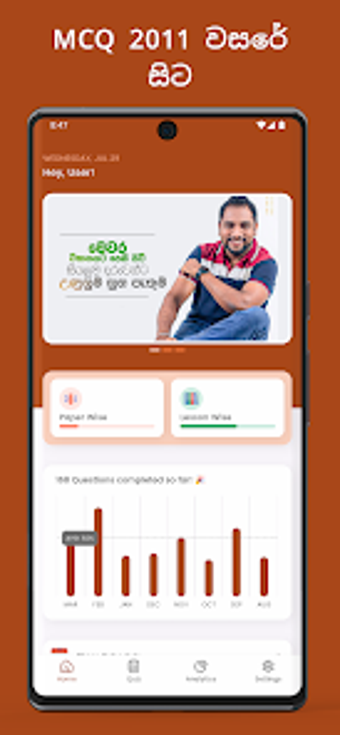
Accounting Plus, developed by Eleetra Private Limited, is a mobile study companion for G.C.E. Advanced Level Accounting students preparing for national exams. The app focuses on intensive multiple-choice practice and lets learners work through past exam items in structured sessions, with tools to monitor performance and collect difficult questions. It is aimed at A/L commerce students and helps organise short study blocks for targeted revision and exam readiness.
What is Accounting Plus used for?
Accounting, developed by Eleetra in collaboration with educator Bharatha Karunanayake, is a specialised study app that centralises past-exam multiple-choice material into short mobile sessions. The product places emphasis on MCQ practice drawn from previous papers so learners recognise common item formats and distractors. This format supports frequent question cycles on a phone, letting students convert idle minutes into deliberate question work focused on exam-style recall.
How does it support exam-focused study?
The app organises revision around measurable practice outcomes and targeted follow-up. It produces a personalised progress report so students can identify stronger and weaker areas, and it compiles unanswered or challenging items for directed review. Those outputs let learners prioritise limited study time with concrete goals and create a repeatable routine of practice, review, and targeted follow-up between classroom lessons.
Is it suitable for A/L students and easy to access?
The tool targets A/L learners in the commerce stream and uses a mobile-first interface built for Android devices, including modern releases up to Android 15. Support for standard phone screens and touch navigation makes it usable between classes or while commuting. The app’s syllabus orientation means it fits candidates preparing for the national exam schedule rather than broad, general study plans.
Can learners shape practice by syllabus units and past papers?
Practice can be arranged by year/paper or by lesson units, so students can mirror classroom progression or concentrate on individual syllabus sections. Curated content matches A/L Accounting topics, enabling lesson-by-lesson reinforcement that aligns with a teacher’s pace. That structure helps learners plan short, focused study blocks and repeat specific unit questions until they feel confident with a topic.
A practical, exam-centred option for A/L Accounting candidates
Accounting Plus is a focused study choice for candidates preparing within the A/L Accounting syllabus; its curriculum-specific design makes it less helpful for learners outside that exam track. Learners should schedule short daily timed question sessions and pair app drills with classroom problem-solving to build calculation fluency. In practice, the app supports disciplined, exam-oriented practice but works best as one component of a broader revision plan.